

Project
A project is an environment for managing your activities in Voucherify. A project can be used to run them concerning a brand, region, or currency, or you can use a project for development or staging purposes. For example, each Voucherify account has a Sandbox project for testing purposes.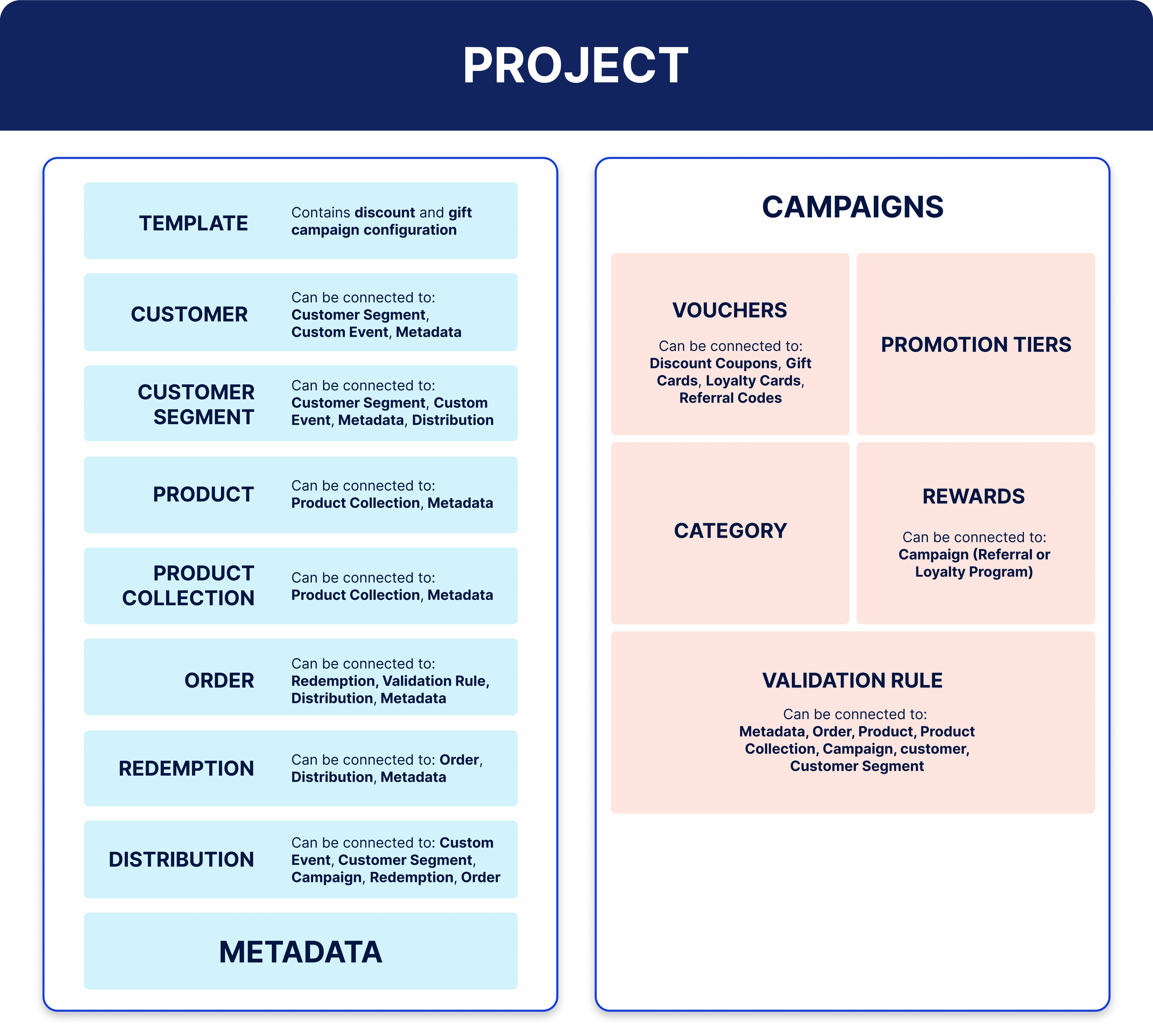
Read Team and project settings article to learn more.
Voucherify Management API, available as an Enterprise feature, enables you to manage projects through the API. For instance, you can set up new projects with a specific configuration fully programmatically. You can conveniently list projects, retrieve specific project details, update, or delete projects and different project settings as needed.
Campaigns, vouchers, and promotions
A project consists of campaigns that are based on vouchers and promotion campaigns, which don’t need them.Campaign
A campaign is a basic entity that is used to carry out promotional activities. There are five basic campaign types, which create:- discount coupons,
- loyalty cards.
- gift vouchers,
- referral codes,
- promotions (without vouchers),
Campaign API reference
Voucher
A voucher is an entity that is used as an incentive for end customers. Each voucher has a unique code and ID. Vouchers can be grouped under one campaign to serve the same purpose. For example, you can create a campaign that assigns vouchers to customers who have a birthday. A voucher is used in the following types of campaigns:Voucher API reference
Promotions and promotion tiers
A promotion is a campaign that groups specific discounts and it doesn’t require a voucher to be applied to a customer’s order. When a customer or their order qualifies for a promotion, the discount is automatically applied to the order or it can be shown to the customer as a part of the qualification process. A promotion tier is a specific discount with conditions. The discount is automatically applied to the customers and orders that meet the conditions. Promotion tiers can be applied together as a promotion stack or arranged in a hierarchy of an application in one promotion campaign.Promotion tier API reference
Template
A template saves a campaign configuration, so it links with all resources used in the original campaign, such as the validation rule, metadata, rewards, distribution setup, and other details. You can use the template to create a new campaign with the same configuration without setting it up again manually or edit its details, if necessary.- Create campaign template API endpoint
- Campaign templates article
Order
An order represents an order placed by a customer in your system. It contains details about the items and details about any incentives as well as discounts applied to the order. Orders work together with other Voucherify entities, see examples in the table below.Order object API reference
Products and product collections
Voucherify can store your product catalog. The products can be also grouped together in collections.Product
A product represents an item or service sold to end-customers. A product can also have its variants – Stock Keeping Units (SKUs). Products work together with other Voucherify entities, see examples in the table below.Product object API reference
Product collection
A product collection groups products according to criteria defined with filters, for example price or metadata values. Product collections work together with other Voucherify entities, see examples in the table below.Product collection object API reference
Reward
A reward is a benefit that customers can get by exchanging (redeeming) loyalty points or as part of a referral program. Rewards work together with other Voucherify entities, see examples in the table below.Reward object API reference
Customer and customer segments
Voucherify can store details about your customers. You can also group customers into segments according to defined criteria.Customer
A customer is an entity in Voucherify that represents an end customer of a store, a B2B customer, or any partner who sees products or services. A customer can be assigned vouchers or be eligible for promotions. A customer object can have many parameters, for example:- name,
- email,
- birthdate,
- metadata.
Customer object API reference
Customer segments
A segment is a customer group that shares the same parameters. There are two types of segments in Voucherify:- static: it contains a manually prepared list of customers based on customer ID,
- dynamic: customers are dynamically added to or removed from the segment if they match a given filter. For example, it can be the customer’s birthday is today, they haven’t placed any orders in the past 30 days, or they joined a newsletter.
Customer segments article
Incentivization rules and processes
In Voucherify, you can set rules that govern how incentives, such as vouchers or discounts, are applied. Also, the incentives can be managed under several processes related to their application.Validation rules
Validation rules are conditions that are applied to campaigns, generic (standalone) vouchers, promotion tiers, or distributions. For example, the customer or their order must meet the conditions for the incentive to be applied. A validation rule can be created in advance. It is an independent object which can be attached to or detached from the above-mentioned objects to be reused in the future. Validation rules work together with other Voucherify entities, see examples in the table below.- Validation rule API reference
- Validation rules and campaign limits article
- How to build validation rules article
Qualification
Qualification is the process that validates which incentives (for example products, vouchers, or promotions) can be used in the customer’s order.- Qualification API reference
- Qualification – checking eligibility article
Validation
Validation is the process that checks if a combination of vouchers or promotion tiers together with the applied validation rules are valid to the customer. On the basis of validation, the final price is calculated. Validation checks up to 30 vouchers or promotion tiers.Validate stackable discounts API reference
Redemption
Redemption is the process of applying and consuming vouchers or promotion tiers to the customer’s order. Redemption checks if a voucher or promotion tier together with the applied validation rules is valid to the customer. Redemption checks up to 30 vouchers or promotion tiers. Redemptions work together with other Voucherify entities, see examples in the table below.Redeem stackable discounts API reference
Rollback
Rollback is the process in which redemption is reverted. A rollback withdraws the incentive from the customer’s order and updates its status.Rollback stackable discounts API reference
Communication
Voucherify can be used as part of your strategy for communication with your customer base. Voucherify also supports webhooks to receive notifications about events that occurred regarding, for example, customers, redemptions, or loyalty programs.Distribution
Distribution is a process of sending vouchers and other promotional messages to customers. Distribution can be used as a publication method. There are two types of distributions:- automatic: it is triggered by an event,
- manual: the message is sent to all customers or a specified group.
- emails,
- text messages,
- live chat,
- push notifications.
Publication
Publication is the process of assigning a voucher to an end customer.Publication API reference
Webhooks
A webhook is an HTTP callback that is triggered by an event rather than a request. Webhooks can be used to notify external systems about any events or relevant actions performed with Voucherify. The events can be custom. Custom events are objects that can be used to track end-customer interactions with a system.- Introduction to Voucherify webhooks article
- Custom event API reference
- Webhook notifications article
- Custom events article
Metadata (custom attributes)
Metadata (custom attributes) are customizable data that can be added to default Voucherify objects. A custom attribute consists of a key and value pair.- Metadata schema API reference
- Metadata mapping article
- Create metadata schema – Management API endpoint
- Getting started with metadata article
Custom events
Custom events are actions taken by your customers. You can use them to track clients’ behavior and then build highly personalized campaigns, for example, send customers a 5% off coupon if they’ve abandoned the cart.- Custom events article
- Create custom event schema – Management API endpoint